Profiling Data Collection Guide
Last updated: 12/20/2025.
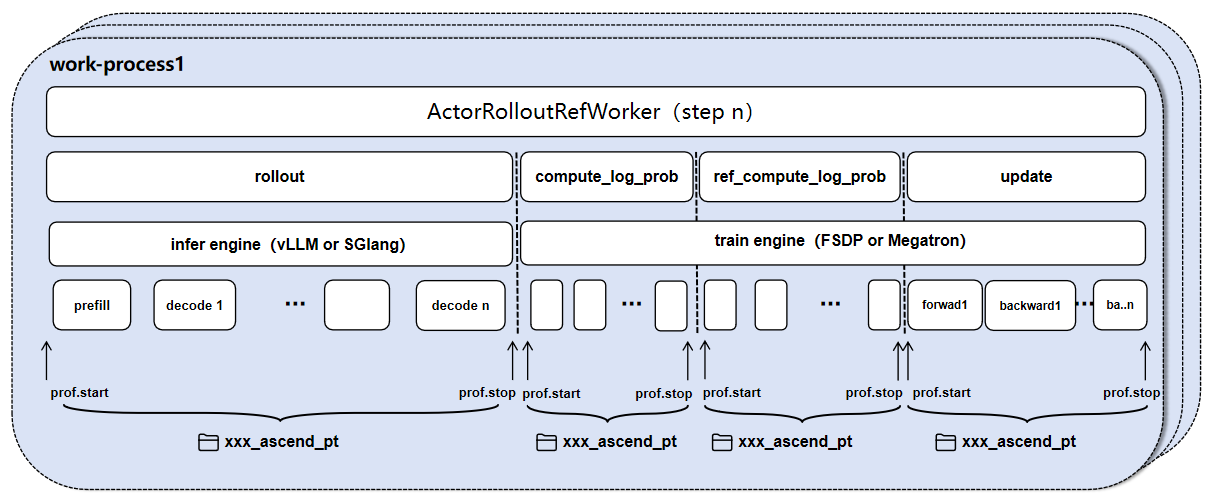
This is a tutorial for data collection using the GRPO or DAPO algorithm based on FSDP or MindSpeed(Megatron) on Ascend devices.
Configuration
Leverage two levels of configuration to control data collection:
Global profiler control: Use parameters in
verl/trainer/config/ppo_trainer.yaml(FSDP) orverl/trainer/config/ppo_megatron_trainer.yaml(MindSpeed) to control the collection mode and steps.Role profile control: Use parameters in each role's
profilefield to control various parameters.
Global collection control
Use parameters in ppo_trainer.yaml to control the collection mode and steps.
global_profiler: Control the ranks and mode of profiling
tool: The profiling tool to use, options are nsys, npu, torch, torch_memory.
steps: This parameter can be set as a list that has collection steps, such as [2, 4], which means it will collect steps 2 and 4. If set to null, no collection occurs.
save_path: The path to save the collected data. Default is "outputs/profile".
Role collection control
In each role's profiler field, you can control the collection mode for that role.
enable: Whether to enable profiling for this role.
all_ranks: Whether to collect data from all ranks.
ranks: A list of ranks to collect data from. If empty, no data is collected.
tool_config: Configuration for the profiling tool used by this role.
Use parameters in each role's profiler.tool_config.npu to control npu profiler behavior:
level: Collection level—options are level_none, level0, level1, and level2
level_none: Disables all level-based data collection (turns off profiler_level).
level0: Collect high-level application data, underlying NPU data, and operator execution details on NPU. After balancing data volume and analytical capability, Level 0 is recommended as the default configuration.
level1: Extends level0 by adding CANN-layer AscendCL data and AI Core performance metrics on NPU.
level2: Extends level1 by adding CANN-layer Runtime data and AI CPU metrics.
contents: A list of options to control the collection content, such as npu, cpu, memory, shapes, module, stack.
npu: Whether to collect device-side performance data.
cpu: Whether to collect host-side performance data.
memory: Whether to enable memory analysis.
shapes: Whether to record tensor shapes.
module: Whether to record framework-layer Python call stack information. It is recommended to use 'module' instead of 'stack' for recording call stack information, as it costs less performance overhead.
stack: Whether to record operator call stack information.
analysis: Whether to enable automatic data parsing.
discrete: Whether to enable discrete mode.
profile_token_start: Effective only for the rollout role; defines the start response-token index for rollout decoding collection. It is applied only when valid (0-based,
profile_token_end > profile_token_start, and the window is within response length).profile_token_end: Effective only for the rollout role; defines the stop response-token index (exclusive) for rollout decoding collection. It is applied only when valid (0-based,
profile_token_end > profile_token_start, and the window is within response length).
Examples
Disabling collection
global_profiler.steps=null
End-to-End collection
global_profiler.tool=npu
global_profiler.steps="[1, 2, 5]" # Number of steps to be collected.
global_profiler.save_path=./outputs/profile
actor_rollout_ref.actor.profiler.enable=True
actor_rollout_ref.actor.profiler.all_ranks=False
actor_rollout_ref.actor.profiler.ranks="[0]" # Only collect rank 0 data.
actor_rollout_ref.actor.profiler.tool_config.npu.discrete=True # The discrete mode is recommended, in which data of each phase is stored separately.
actor_rollout_ref.actor.profiler.tool_config.npu.contents="['npu','cpu']" # Control collection list, default cpu, npu, can configure memory, shapes, module, etc.
actor_rollout_ref.actor.profiler.tool_config.npu.level=level1
actor_rollout_ref.actor.profiler.tool_config.npu.analysis=False # Disabling automatic data parsing
# rollout & ref follow actor settings
Separation of Training and Inference Collection
global_profiler.tool=npu
global_profiler.steps="[1, 2, 5]" # Number of steps to be collected.
global_profiler.save_path=./outputs/profile
actor_rollout_ref.actor.profiler.enable=True
actor_rollout_ref.actor.profiler.all_ranks=False
actor_rollout_ref.actor.profiler.ranks="[0]" # Only collect rank 0 data.
actor_rollout_ref.actor.profiler.tool_config.npu.discrete=True # The discrete mode is recommended, in which data of each phase is stored separately.
actor_rollout_ref.actor.profiler.tool_config.npu.contents="['npu','cpu']" # Control collection list, default cpu, npu, can configure memory, shapes, module, etc.
actor_rollout_ref.actor.profiler.tool_config.npu.level=level1
actor_rollout_ref.actor.profiler.tool_config.npu.analysis=False # Disabling automatic data parsing

actor_rollout_ref.rollout.profiler.enable=True
actor_rollout_ref.rollout.profiler.all_ranks=False
actor_rollout_ref.rollout.profiler.ranks="[0]" # Only collect rank 0 data.
# (Optional) Collect data by response token. If start and stop are not set, the entire rollout phase is collected.
actor_rollout_ref.rollout.profiler.tool_config.npu.profile_token_start=12
actor_rollout_ref.rollout.profiler.tool_config.npu.profile_token_end=46
# ref follow actor settings
Agent Loop Mode Description:
When Rollout runs in Agent Loop mode, performance data for the Rollout phase must be collected using discrete mode. In this case, the Profiler is triggered by the inference engine backend.
Rank Definition: ranks in the Rollout configuration refers to Replica Rank (inference instance index), not Global Rank.
Inference Engine Support: Currently, vLLM and SGLang engines are supported without additional settings. Specific details are as follows:
vLLM Engine: Automatically collects AsyncLLM scheduling stacks and inference process performance data. Does not support setting analysis (defaults to no analysis, requires offline analysis) and profiler_level (defaults to level1).
SGLang Engine: Automatically collects inference process performance data. Does not support the memory option in contents. Does not support setting analysis (defaults to enabled) and profiler_level (defaults to level0).
Fully Async Policy Mode Description:
In Fully Async Policy mode,
global_profiler.stepsrefers to the step after eachupdate_weightsround. This is consistent with synchronous mode, not a per mini-batch step within a single training round.Because it reuses Agent Loop collection capabilities, the notes for Fully Async Policy mode are the same as for Agent Loop.
Visualization
Collected data is stored in the user-defined save_path and can be visualized by using the MindStudio Insight tool.
Additionally, in a Linux environment, the MindStudio Insight tool is provided in the form of a [JupyterLab Plugin](https://www.hiascend.com/document/detail/zh/mindstudio/82RC1/GUI_baseddevelopmenttool/msascendinsightug/Insight_userguide_0130.html), offering a more intuitive and highly interactive user interface. The advantages of the JupyterLab plugin are as follows:
Seamless integration: Supports running the MindStudio Insight tool directly within the Jupyter environment, eliminating the need to switch platforms or copy data from the server, enabling data to be collected and used immediately.
Fast startup: Allows MindStudio Insight to be launched quickly via the JupyterLab command line or graphical interface.
Smooth operation: In a Linux environment, launching MindStudio Insight through JupyterLab effectively alleviates performance lag compared to the full-package communication mode, significantly improving the user experience.
Remote access: Supports remotely launching MindStudio Insight. Users can connect to the service via a local browser for direct visual analysis, reducing the difficulty of uploading and downloading data during large-model training or inference.
If the analysis parameter is set to False, offline parsing is required after data collection:
import torch_npu
# Set profiler_path to the parent directory of the "localhost.localdomain_<PID>_<timestamp>_ascend_pt" folder
torch_npu.profiler.profiler.analyse(profiler_path=profiler_path)
Advanced Guide: Fine-grained Collection
Background and Challenges
Although the configuration-based collection method mentioned above is convenient, it faces challenges in training scenarios with long sequences (Long Context) or large global batch sizes (Large Global Batch Size). Within a complete training step (Step), model computation exhibits high-frequency and repetitive characteristics:
Rollout phase: Sequence generation (Generate Sequence) is an autoregressive process involving thousands of forward computations of the Decoder model.
Training phase: To control peak memory usage, verl typically adopts a Micro-Batch strategy, dividing large data streams into multiple micro-batches for computation.
compute_log_prob (Actor/Ref): Involves multiple rounds of pure forward propagation.
update_policy (Actor/Critic): Involves multiple rounds of forward and backward propagation.
This characteristic leads to massive and repetitive operator records from full profiling. As shown in the image below:
Even with discrete mode enabled, performance data files for a single stage can still reach several TB, leading to parsing failures or visualization tool lag.
Solution: Critical Path Sampling
To solve the above problems, we can adopt a critical path sampling strategy: Based on the API interface provided by torch_npu.profiler, directly modify Python source code to collect only representative data segments (such as specific Decode Steps or the first Micro-Batch).
Important Notes
This chapter involves direct source code modification. It is recommended to back up files before modification and restore them after debugging.
When using code instrumentation for collection, be sure to disable global collection (
global_profiler: steps: null) inppo_trainer.yamlorppo_megatron_trainer.yamlto avoid Profiler conflicts.
1. Fine-grained Collection in Rollout Phase
For vLLM or SGLang inference engines, we can control the schedule parameter to collect model forward propagation performance data for specific tokens.
vLLM Engine
Reference Version: vLLM v0.11.0, vLLM-Ascend v0.11.0rc1
Modified File:
vllm-ascend/vllm_ascend/worker/worker_v1.py
    class NPUWorker(WorkerBase):

        def __init__(self, *args, **kwargs):
            # ... existing code ...

+           # Initialize profiler
+           import torch_npu
+           experimental_config = torch_npu.profiler._ExperimentalConfig(
+               profiler_level=torch_npu.profiler.ProfilerLevel.Level1,
+               export_type=torch_npu.profiler.ExportType.Db,  # You can choose torch_npu.profiler.ExportType.Text format
+           )
+           self.profiler_npu = torch_npu.profiler.profile(
+               activities=[torch_npu.profiler.ProfilerActivity.CPU, torch_npu.profiler.ProfilerActivity.NPU],
+               with_modules=False,  # Collect call stack
+               profile_memory=False,  # Collect memory
+               experimental_config=experimental_config,
+               # Skip first step, warmup one step, collect 3 steps, repeat 1 time. If you want to collect decode steps 30~70, set schedule=torch_npu.profiler.schedule(wait=29, warmup=1, active=30, repeat=1)
+               schedule=torch_npu.profiler.schedule(wait=1, warmup=1, active=3, repeat=1),
+               on_trace_ready=torch_npu.profiler.tensorboard_trace_handler("./outputs/vllm_profile", analyse_flag=True)  # Data save path and whether to parse online
+           )
+           self.profiler_npu.start()

            # ... existing code ...

        def execute_model(self, scheduler_output=None, intermediate_tensors=None, **kwargs):
            # ... existing code ...
            output = self.model_runner.execute_model(scheduler_output,
                                                intermediate_tensors)

+           self.profiler_npu.step()  # Drive schedule to collect partial decode steps

            # ... existing code ...
SGLang Engine
Reference Version: SGLang master branch
Modified File:
sglang/python/sglang/srt/model_executor/model_runner.py
    # ... existing imports ...
+   import torch_npu

    class ModelRunner:

        def __init__(self, *args, **kwargs):
            # ... existing init code ...

+           # Initialize profiler (same configuration as above, omitted)
+           experimental_config = torch_npu.profiler._ExperimentalConfig(...)
+           self.profiler_npu = torch_npu.profiler.profile(
+               # ...
+               # Skip first step, warmup one step, collect 3 steps, repeat 1 time.
+               schedule=torch_npu.profiler.schedule(wait=1, warmup=1, active=3, repeat=1),
+               on_trace_ready=torch_npu.profiler.tensorboard_trace_handler("./outputs/sglang_profile", analyse_flag=True)
+           )
+           self.profiler_npu.start()

        def forward(self, forward_batch, **kwargs):
            # ... existing code ...

+           self.profiler_npu.step()  # Drive schedule to collect partial decode steps
            return output
2. Fine-grained Collection in compute_log_prob (Actor & Ref) Phase
This phase computes probability distributions for new and old policies.
With the unified model engine, both actor and reference log-prob
computation go through TrainingWorker.infer_batch which dispatches
to BaseEngine.infer_batch on the underlying backend engine.
FSDP Backend
The FSDP backend allows fine-grained control at the Micro-Batch level. Instrument the micro-batch loop inside the FSDP engine's forward pass.
Modified File:
verl/workers/engine/fsdp/transformer_impl.py(FSDPEngineWithLMHead.forward_backward_batch/forward_step)
    # ... import dependencies ...
+   import torch_npu

    class FSDPEngineWithLMHead(FSDPEngine):

        def forward_backward_batch(self, data: TensorDict, loss_function, forward_only=False):

+           role = "Ref" if forward_only and not self.optimizer_config else "Actor"
+           # Prepare profiler (same configuration as above, omitted)
+           experimental_config = torch_npu.profiler._ExperimentalConfig(...)
+           self.prof_npu = torch_npu.profiler.profile(
+               # ...
+               # wait=0, warmup=0, active=1: directly collect first micro-batch
+               schedule=torch_npu.profiler.schedule(wait=0, warmup=0, active=1, repeat=1),
+               on_trace_ready=torch_npu.profiler.tensorboard_trace_handler(f"./outputs/{role}_compute_log_prob", analyse_flag=True)
+           )

+           # forward_backward_batch is shared by ref and actor. Use the role flag to
+           # distinguish; to collect actor_compute_log_prob instead, switch to role=="Actor":
+           if role == "Ref":
+               self.prof_npu.start()

            for micro_batch in micro_batches:

                # ... original computation logic ...
                with torch.no_grad():
                    output = self.forward_step(micro_batch, loss_function, forward_only=True)

+                   # Drive schedule to collect micro batch
+                   if role == "Ref":
+                       self.prof_npu.step()

                # ...
Megatron Backend
The Micro-Batch scheduling in the Megatron backend is managed internally
by Megatron's pipeline-parallel forward_backward_func and does not
currently support fine-grained collection at the Micro-Batch level
through simple code instrumentation. It is recommended to use the global
profiler configuration for collection.
3. Fine-grained Collection in update_policy (Actor & Critic) Phase
The Update phase includes forward and backward propagation. In the
unified engine, mini-batch iteration is driven by
TrainingWorker.train_mini_batch in verl/workers/engine_workers.py,
which then calls train_batch for each mini-batch.
FSDP Backend
The FSDP backend supports collection at both Mini-Batch and Micro-Batch
granularities. For Mini-Batch scope, instrument train_mini_batch in
TrainingWorker; for Micro-Batch scope, instrument the per-micro-batch
loop inside the FSDP engine's forward_backward_batch.
Modified File:
verl/workers/engine_workers.py(TrainingWorker.train_mini_batch) for Mini-Batch granularity, orverl/workers/engine/fsdp/transformer_impl.py(FSDPEngineWithLMHead.forward_backward_batchfor Micro-Batch)
    # ... import dependencies ...
+   import torch_npu

    class TrainingWorker(Worker, DistProfilerExtension):

        def train_mini_batch(self, data: TensorDict) -> TensorDict:

+           # Prepare profiler (same configuration as above, omitted)
+           experimental_config = torch_npu.profiler._ExperimentalConfig(...)
+           self.prof_npu = torch_npu.profiler.profile(
+               # ...
+               # Only collect first Mini Batch (including all Micro-Batch computations and one optimizer update)
+               schedule=torch_npu.profiler.schedule(wait=0, warmup=0, active=1, repeat=1),
+               on_trace_ready=torch_npu.profiler.tensorboard_trace_handler("./outputs/fsdp_actor_update_profile", analyse_flag=True)
+           )
+           self.prof_npu.start()

            # ... Mini Batch loop over the dataloader ...
            for batch_idx, mini_batch_td in enumerate(dataloader):
                # ... calls self.train_batch(mini_batch_td), which in turn runs
                # Forward & Backward on every micro-batch and a single optimizer step
                # inside the engine ...
                actor_output = self.train_batch(mini_batch_td)

+               # Drive schedule to collect mini batch; for micro-batch granularity, move
+               # self.prof_npu.step() into the micro-batch loop inside
+               # FSDPEngineWithLMHead.forward_backward_batch.
+               self.prof_npu.step()
Megatron Backend
The Megatron backend supports collection at the Mini-Batch granularity.
The same TrainingWorker.train_mini_batch entry point applies – the
Megatron engine internally runs Megatron's pipeline-parallel forward /
backward schedule and the optimizer step.
Modified File:
verl/workers/engine_workers.py(TrainingWorker.train_mini_batch) — identical to the FSDP snippet above; the output path should be renamed (e.g../outputs/megatron_actor_update_profile) to distinguish traces from different backends.